
Task
- View a report on splunk via the splunk API
- Only one specific user group shall have these rights
Make sure that the report is contained inside an app only one user can reach
Ingredients
- Custom App
- User with rest API capabilities
- Curl Command
- Route to splunk REST API (port 8089)
Recipy
Creating user with REST API capabilities
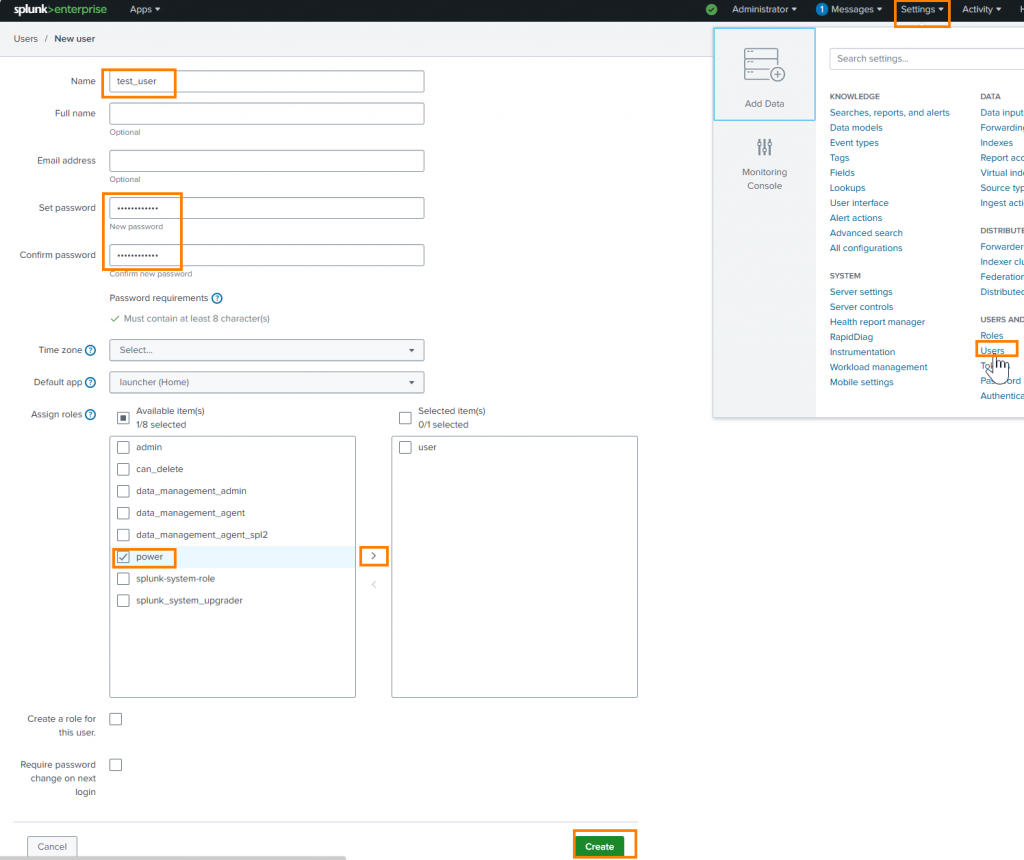
Go ahead and create a second user for testing purposes. The Second user won’t have permissions to read reports in the custom app (my_custom_app). And should therefore not have the ability to access the report we want to expose via API.
The user role should be enough to allow access to the rest api. If not; create a new role with the following capabilities and assign it to your newly created user.
- rest_apps_view
- rest_properties_get
- rest_properties_set
- search
Define roles on the Splunk platform with capabilities | Splunk Docs
Creating a Custom App
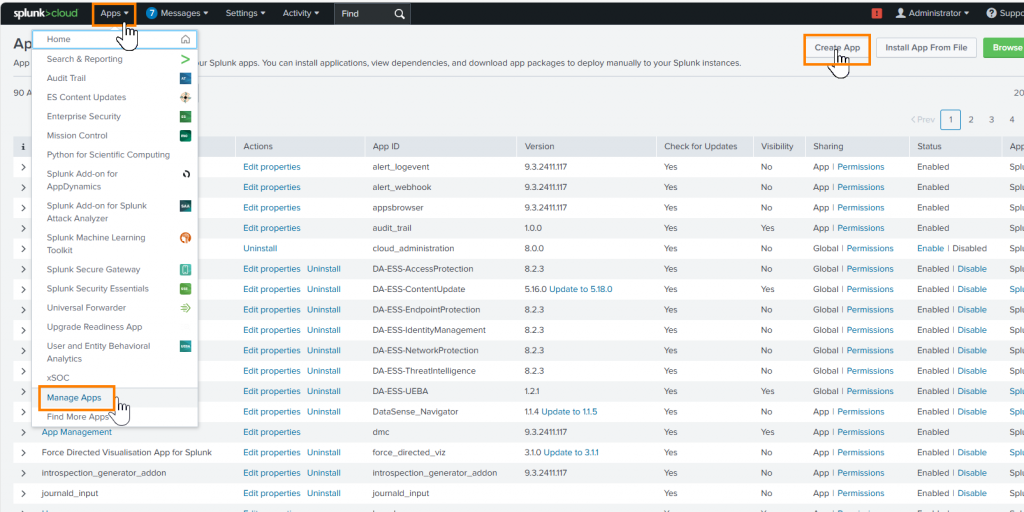
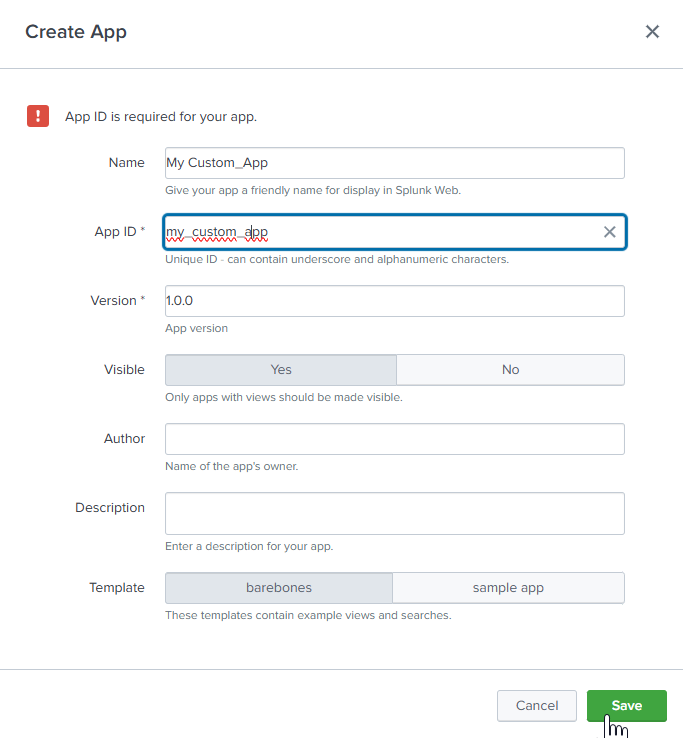
Running Curl Searches
Examples from : What capabilities does a REST API only user need? – Splunk Community
Asynchronous search:
$ curl -u admin:changeit -k https://localhost:8089/services/search/jobs -d search="search index=_internal"
    <?xml version="1.0" encoding="UTF-8"?>
    <response>
      <sid>1520569635.358</sid>
    </response>
Fetching results:
$ curl -G -u admin:changeit -k https://localhost:8089/services/search/jobs/1520569635.358/results -d output_mode=csv
Synchronous search:
$ curl -u admin:changeit -k https://localhost:8089/services/search/jobs/export -d output_mode=csv -d search="search index=_internal |head 10"
Getting authentication token:
$ curl -k https://localhost:8089/services/auth/login --data-urlencode username=admin --data-urlencode password=changeit
<response>
  <sessionKey>lTsi0Gyhadou77kplKboa8_4DBsMbRB1gpu6sCEvIXIFotnMqNLOJyXQgCLdwM^uhDSRgxpfg_dG0gSbtRIkObpkWrbF2TisTo</sessionKey>
</response>
Running synchronous search with authentication token:
$ curl -k -H "Authorization: Splunk lTsi0Gyhadou77kplKboa8_4DBsMbRB1gpu6sCEvIXIFotnMqNLOJyXQgCLdwM^uhDSRgxpfg_dG0gSbtRIkObpkWrbF2TisTo"
https://localhost:8089/services/search/jobs/export
-d output_mode=csv
-d search="search index=_internal |head 10"
Running synchronous search writing report into file
curl -k -u test_user:XXXXXX
  --request POST 'https://localhost:8089/services/search/jobs/export'
  --data-urlencode 'search=| loadjob savedsearch="test_user:my_custom_app:test_api_report"'
  --data-urlencode 'output_mode=json'
  -o report.json
Tests
Using a user that does not have access to the app where the saved search is stored, to view the results, is impossible.
Using a user that has access to the app where a lookup is stored to view lookups by running a search | inputlookup mysecretlookup yields results
There is no endpoint in which one can access a dashboard with a user that does not have any search rights but only displaying rights because the output is not HTML but only XML
Knowledge endpoint descriptions | Splunk Docs
Things to think about
- Every user with the role user has rest capabilities and can use CURL to run searches if port 8089 is available to them.
- Should this capability be removed; every report using command | rest has to be reviewed
- restmap can be used to restrict the source capable of accessing rest endpoint with the following configuration
acceptFrom=<network_acl> ...
* Lists a set of networks or addresses to allow this endpoint to be accessed
  from.
* This shouldn't be confused with the setting of the same name in the- Re: Restrict search command usage (rest in particu… – Splunk Community
- If user A has access to App AA and App BB and user B has access to App AA and CC:
- All reports in App AA will be able to be accessed by user A and B
- All reports in App BB will be able to be accessed by user A
- All reports in App CC will be able to be accessed by user B
Ressources
Re: Restrict search command usage (rest in particu… – Splunk Community
Manage access to custom REST endpoints | Documentation | Splunk Developer Program
How to create new role capabilities to edit dashbo… – Splunk Community

Erkunden Sie inspirierende Geschichten und Experteneinblicke.
Dieser Abschnitt hebt den Zweck des Blogs hervor, indem er fesselnde Geschichten, Expertenmeinungen und wertvolle Erkenntnisse bietet, damit Leser lernen und wachsen können.
Blog Kategorien
Vorgestellt





-

Hello world!
This website, shall help me retain the knowledge I have aquired throughout the many little IT-projects I work on in a daily basis, whether it’s setting up a server, utilizing a new service or troubleshooting IT-Infrastructure. Come on this journey with me, maybe you will also find pieces…
Schreibe einen Kommentar