

I would like to have a silent Server and therefore I would like to spin down my disks when I don’t need them. Luckily I use a nvme for all my virtual machine storage and an ssd for booting, which are practically silent.
For Longterm Storage I have 2 spinning SAS HDDs on a RAID controller.
Before I attempted to access my HDD I flashed my LSI Raid controller from IR to IT mode in oder to directly access the Harddrive.
This might not be necessary. You can try using sdparm instead of hdparm and see if you can access the disks behind your RAID controller without having the discs on JBOD mode (IT mode)
The important part is to deactivate any processes in Proxmox that regularly activate your spinning disks, otherwise they will spin up almost immediately after you spun them down.
pvestatd
smartd
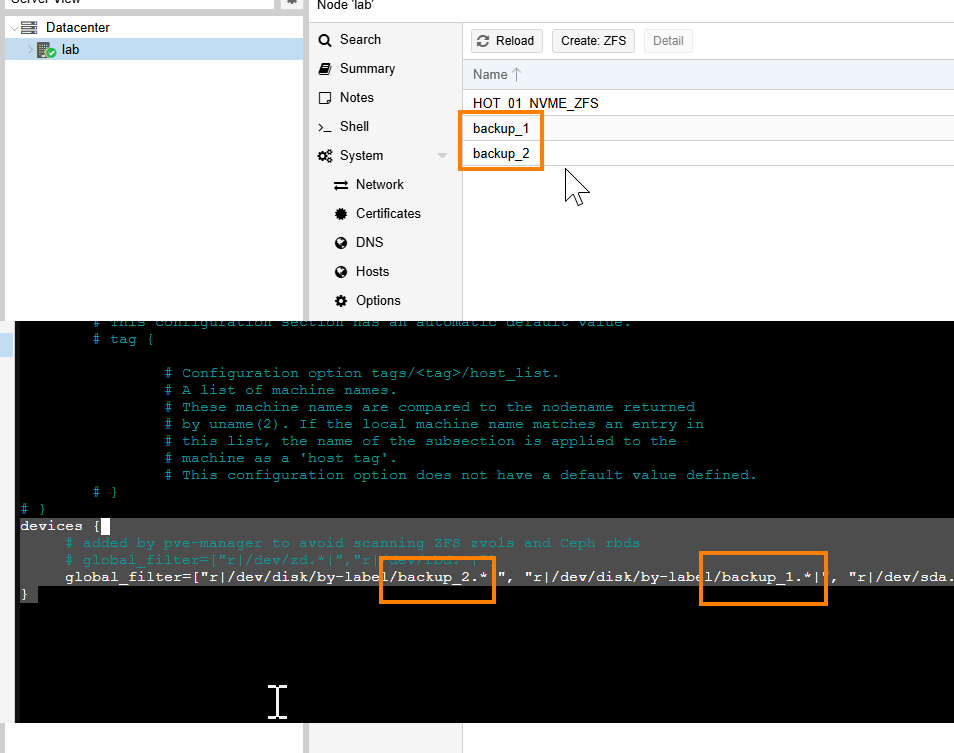
Stop ProxMox Services from addressing the HDDS by adding them into filter lists
nano -4 /etc/lvm/lvm.confscroll to the very end of lvm.conf file
devices {
     # added by pve-manager to avoid scanning ZFS zvols and Ceph rbds
     # global_filter=["r|/dev/zd.*|","r|/dev/rbd.*|"]
     global_filter=["r|/dev/disk/by-label/backup_2.*|", "r|/dev/disk/by-label/backup_1.*|", "r|/dev/sda.*|", "r|/dev/zd.*|", "r|/dev/m>
}
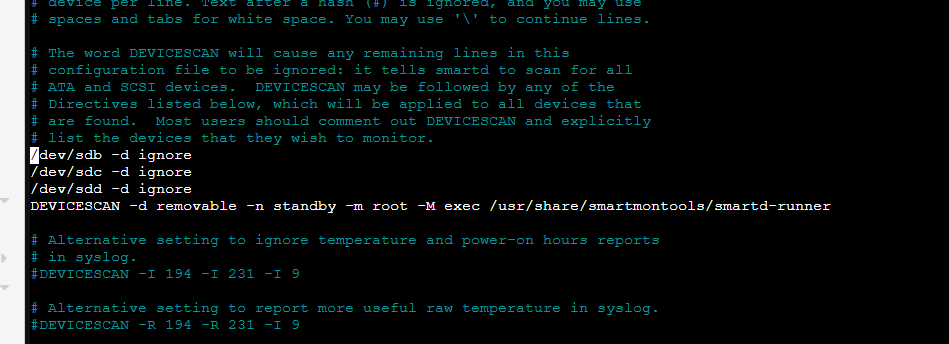
nano cat /etc/smartd.confadd this to your smartd configuration
# The word DEVICESCAN will cause any remaining lines in this
# configuration file to be ignored: it tells smartd to scan for all
# ATA and SCSI devices.  DEVICESCAN may be followed by any of the
# Directives listed below, which will be applied to all devices that
# are found.  Most users should comment out DEVICESCAN and explicitly
# list the devices that they wish to monitor.


/dev/sdb -d ignore
/dev/sdc -d ignore
/dev/sdd -d ignore

....
Example commands to spin down disks manually
sdparm --command=stop /dev/sdcUnfortunately after spin down the disk doesn’t seem to wake up by itsself automatically when needed. I hope to be able to address this issue soon
The Next step would integrate these commands into a startup script or a cron schedule.
For People like may me, that only need to activate the slow spinning HDDs once a week for a backup it can be an option to script everything with cronjob. Otherwise having the disks wake up automatically everytime a service wants to use them is definetely a good thing to have.
Ressources:
HDD never spin down | Proxmox Support Forum
HDD never spin down | Page 2 | Proxmox Support Forum
Hard Drive error: bad/missing sense data – Ask Ubuntu

Erkunden Sie inspirierende Geschichten und Experteneinblicke.
Dieser Abschnitt hebt den Zweck des Blogs hervor, indem er fesselnde Geschichten, Expertenmeinungen und wertvolle Erkenntnisse bietet, damit Leser lernen und wachsen können.
Blog Kategorien
Vorgestellt





-

Hello world!
This website, shall help me retain the knowledge I have aquired throughout the many little IT-projects I work on in a daily basis, whether it’s setting up a server, utilizing a new service or troubleshooting IT-Infrastructure. Come on this journey with me, maybe you will also find pieces…
Schreibe einen Kommentar